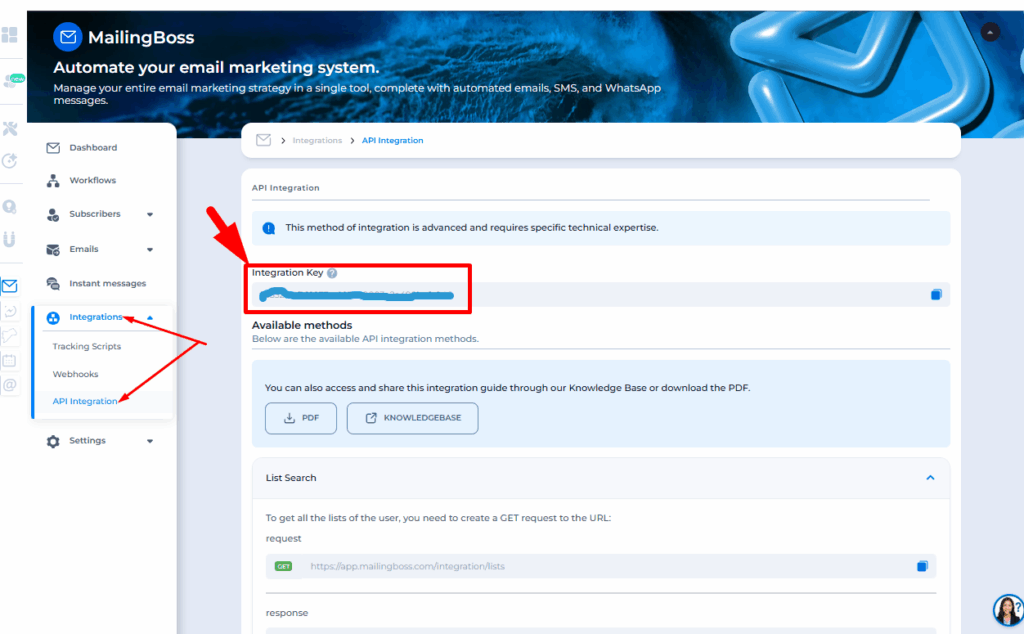
1. Locate the Token – Integration Key for Authentication
The token required to authenticate API requests is available in the “Integration Key” section of MailingBoss 5.0.
In the MailingBoss 5.0 side menu, access the “Integration” option.
2. Method to Retrieve Lists
To retrieve all user lists, you must send a GET request to the following URL:
https://member.mailingboss.com/integration/index.php/lists/<TOKEN>
Example GET request:
GET /integration/index.php/lists/<TOKEN>
HOST: member.mailingboss.com
Example JSON response:
{
	status: "success", data: [
			{
				list_uid: "m07ug174cie26",
				name: "E-mail Marketing",
				display_name: "E-mail Marketing",
				description: "E-mail Marketing"
			},
			{
				list_uid: "mj546z2pwp2de",
				name: "Form name / List Test",
				display_name: "List Test",
				description: "List Test"
			}
			]
}
3. Method to Retrieve Custom Fields
To retrieve all custom fields, you must send a POST request to the following URL:
https://member.mailingboss.com/integration/index.php/lists/fields/<TOKEN>
Example POST request:
POST /integration/index.php/lists/fields/<TOKEN>
HOST: member.mailingboss.com
PARAMS – Form Data or JSON:
list_uid: STRING (e.g., vh485p76so057)
Example JSON response:
{
	status: "success",
	data: [
			{
				label: "Email",
				tag: “EMAIL",
				type: “text”,
				required: “yes”,
				options: []
			},
			{
				label: "Gender",
				tag: “GENDER",
				type: “dropdown”,
				required: “no”,
				options: [
					{
							name: “Male”,
							value: "male"
					},
					{
							name: “Female”,
							value: "female"
					}
				]
			}
			]
}
JSON Requests:
Note that the request header must specify the request content type, for example:Content-Type: application/json
4. Add a Subscriber (Lead) to a List
To associate a lead with a list, you must send a POST request to the following URL:
https://member.mailingboss.com/integration/index.php/lists/subscribers/create/<TOKEN>
The following fields must be provided: email, list_uid, and taginternals.
Important!
To avoid potential errors, DO NOT include all parameters in the URL.
The URL must contain ONLY the TOKEN. All other parameters must be sent in the location where the data was collected (request body).
Example POST request:
POST /integration/index.php/lists/subscribers/create/<TOKEN>
HOST: member.mailingboss.com
PARAMS – Form Data or JSON:
email: STRING (e.g., teste@teste.com)
list_uid: STRING (e.g., vh485p76so057)
taginternals: STRING (e.g., testetag, tag2)
Example JSON response:
{
	status: "success",
	data: {
			subscriber_uid: "ow305e5oat103",
			email: "teste@teste.com", taginternals:
			"testetag, tag2", status: "confirmed"
	}
}
Example POST request using custom fields:
POST /integration/index.php/lists/subscribers/create/<TOKEN>
HOST: member.mailingboss.com
PARAMS – Form Data or JSON:
email: STRING (e.g., teste@teste.com)
list_uid: STRING (e.g., vh485p76so057)
taginternals: STRING (e.g., testetag, tag2)
gender: STRING VALUE
fname: STRING VALUE
lname: STRING VALUE
Example JSON response:
{
	status: "success",
	data: {
			subscriber_uid: "ow305e5oat103",
			email: "teste@teste.com", taginternals:
			"testetag, tag2", status: "confirmed"
	}
}
JSON Requests:
Make sure the request header specifies the content type, for example:Content-Type: application/json
5. Search for a Subscriber (Lead) by Email
To search for a lead by email, you must send a POST request to the following URL:
https://member.mailingboss.com/integration/index.php/lists/subscribers/search-by-email/<TOKEN>
The following fields must be provided: email and list_uid.
Example POST request:
POST /integration/index.php/lists/subscribers/search-by-email/<TOKEN>
HOST: member.mailingboss.com
PARAMS – Form Data or JSON:
email: STRING (e.g., teste@teste.com)
list_uid: STRING (e.g., vh485p76so057)
Example JSON response:
{
	status: "success",
	data: {
			email: "teste@teste.com", status:
			"confirmed", subscriber_uid:
			"ow305e5oat103", taginternals:
			"testetag, tag2"
	}
}
JSON Requests:
Ensure that the request header specifies the content type, for example:Content-Type: application/json
6. Update Lead Data
You can update a lead’s email, tags, and custom field values by sending a POST request to the following URL:
https://member.mailingboss.com/integration/index.php/lists/subscribers/update/<TOKEN>
The following fields must be provided: subscriber_uid (optional), list_uid, email, and taginternals.
Example POST request:
POST /integration/index.php/lists/subscribers/update/<TOKEN>
HOST: member.mailingboss.com
PARAMS – Form Data or JSON:
subscriber_uid: STRING (e.g., ho984vsr8af13)
list_uid: STRING (e.g., vh485p76so057)
email: STRING (e.g., teste@teste.com)
taginternals: STRING (e.g., testetag, tag2)
taginternals_remove: STRING (e.g., tag1)
Example JSON response:
{
  "status": "success"
}
Example POST request using custom fields:
POST /integration/index.php/lists/subscribers/update/<TOKEN>
HOST: member.mailingboss.com
PARAMS – Form Data or JSON:
subscriber_uid: STRING (e.g., ho984vsr8af13)
list_uid: STRING (e.g., vh485p76so057)
email: STRING (e.g., teste@teste.com)
taginternals: STRING (e.g., testetag, tag2)
taginternals_remove: STRING (e.g., tag1)
gender: STRING VALUE
fname: STRING VALUE
lname: STRING VALUE
Example JSON response:
{
  "status": "success"
}
JSON Requests:
Ensure that the request header specifies the content type, for example:Content-Type: application/json
7. Unsubscribe a Lead from a List
To unsubscribe a lead from a specific list, send a POST request to the following URL:
https://member.mailingboss.com/integration/index.php/lists/subscribers/unsubscribe/<TOKEN>
The following fields must be provided: subscriber_uid and list_uid.
Example POST request:
POST /integration/index.php/lists/subscribers/unsubscribe/<TOKEN>
HOST: member.mailingboss.com
PARAMS – Form Data or JSON:
subscriber_uid: STRING (e.g., ho984vsr8af13)
list_uid: STRING (e.g., vh485p76so057)
Example JSON response:
{
  "status": "success"
}
JSON Requests:
Ensure that the request header specifies the content type, for example:Content-Type: application/json
8. Delete a Subscriber (Lead) from a List
To permanently delete a lead from a specific list, send a POST request to the following URL:
https://member.mailingboss.com/integration/index.php/lists/subscribers/delete/<TOKEN>
The following fields must be provided: subscriber_uid and list_uid.
Example POST request:
POST /integration/index.php/lists/subscribers/delete/<TOKEN>
HOST: member.mailingboss.com
PARAMS – Form Data or JSON:
subscriber_uid: STRING (e.g., ho984vsr8af13)
list_uid: STRING (e.g., vh485p76so057)
Example JSON response:
{
  "status": "success"
}
JSON Requests:
Ensure that the request header specifies the content type, for example:Content-Type: application/json